
Enhance Live Streaming with Truffle.TV
Overview
Truffle.TV is a browser extension designed to elevate the live streaming experience on YouTube Live and Twitch. It enables users to engage more deeply with live content by integrating familiar emotes into chat, customizing their display name and name color, participating in creator predictions, and supporting other streamers through raids. The tool also supports battle pass rewards and improves stream discovery, making it a comprehensive utility for active viewers. Originally known as Mogul.TV, the extension continues to evolve with new features and user feedback. It is tailored for stream enthusiasts, content consumers, and community participants who want a richer, more interactive experience during live broadcasts. The extension operates directly within the browser, requiring no complex setup or additional software. Its core purpose is to bridge the gap between passive viewing and active participation, especially in fast-paced live environments. The developer did not provide additional system requirements beyond the supported platforms.
Key Features & Capabilities
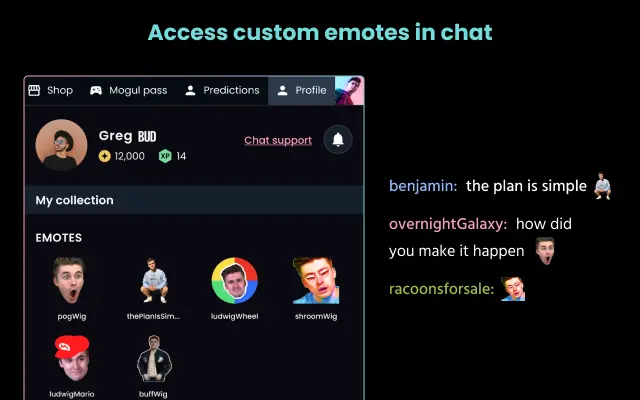
- Emote Integration – Adds familiar emotes to live chat, improving visual communication and community interaction during streams.
- Custom Display Name & Color – Allows users to set a personalized display name and choose a name color for visibility and identity in chat.
- Prediction Participation – Enables users to join in on in-stream predictions, offering a gamified way to engage with creators.
- Raid Support – Facilitates sending raids to other creators, helping to boost community visibility and cross-stream engagement.
- Battle Pass Rewards – Supports unlocking rewards through battle pass systems, encouraging sustained interaction.
- Stream Discovery Tools – Helps users locate live streams more efficiently, improving access to real-time content.
- Experimental Mode – Provides early access to upcoming features for users who want to test new functionalities before public rollout.
These features are designed to enhance user engagement and foster stronger connections within live streaming communities. For example, custom name colors can help users stand out in large chat rooms, while raiding enables viewers to support their favorite creators beyond passive watching. Prediction participation adds a layer of interactivity, turning viewers into active contributors during live events. The extension’s settings menu, accessible via the browser icon, allows for real-time adjustments. Some features, such as channel points and predictions, are currently limited to a subset of creators and are being rolled out gradually.
User Interface, Workflow & Performance
The user interface is minimal and integrated directly into the browser’s header, ensuring it does not disrupt the viewing experience. Navigation is straightforward: clicking the extension icon opens a settings panel where users can configure their display name, name color, and experimental features. The workflow is designed for quick access and seamless integration into live viewing sessions. Users can set preferences before joining a stream or adjust them mid-broadcast. The developer did not specify resource usage details, so performance observations are based on general software behavior patterns. The extension operates in the background with minimal impact on browser performance. Stability is expected to be consistent, as it functions within standard browser environments. No specific CPU or RAM usage data was provided, and no known conflicts with other extensions were mentioned.
Compatibility & System Requirements
Truffle.TV is compatible with Windows, Mac, and Linux operating systems, making it accessible across major desktop platforms. It is designed as a browser extension, so it works with standard web browsers that support extension installations. The installation size is 1.2 MB, indicating a lightweight footprint. The software version is 1.0.0, released on May 15, 2024. Exact system requirements were not listed, and compatibility information was partially provided. Users should ensure their browser is up to date to maintain full functionality. The extension does not require administrative privileges for installation and can be added through official browser extension stores.
Pros and Cons
Pros
- Enhances live chat with emotes and customization options
- Supports interactive features like predictions and raids
- Lightweight at just 1.2 MB
- Available for Windows, Mac, and Linux
- Free to use with no cost barrier
- Experimental mode allows early access to new features
Cons
- Some features like predictions and channel points are limited to select creators
- Full functionality may depend on creator participation
- No detailed performance or resource usage data provided
- Requires browser extension support for operation
- Not available as a standalone desktop application
FAQ Section
Is Truffle.TV compatible with all browsers?
Truffle.TV is designed to work with standard web browsers that support extensions. Compatibility depends on the browser’s extension framework and update status.
Is the extension safe to use?
As a browser extension, Truffle.TV operates within the browser’s security model. It does not require access to sensitive data beyond chat and stream interaction. Users should install it from official extension stores to ensure authenticity.
How often does Truffle.TV receive updates?
Updates are released periodically to add new features, fix bugs, and improve compatibility. The latest version is 1.0.0, released on May 15, 2024.
Can I use Truffle.TV without a paid subscription?
Yes, Truffle.TV is free to use. There are no subscription fees or hidden costs associated with the extension.
Does Truffle.TV work offline?
Truffle.TV requires an active internet connection and access to YouTube Live or Twitch to function. It cannot operate in offline mode.
Final Thoughts + CTA
Truffle.TV delivers a robust set of tools that transform passive viewing into active participation on YouTube Live and Twitch. Its integration of emotes, chat customization, and interactive features like raids and predictions makes it a valuable asset for stream fans. The lightweight design and cross-platform availability ensure broad accessibility. While some advanced features are currently limited to select creators, the extension’s roadmap and experimental mode show strong development momentum. For viewers seeking a more immersive and interactive experience, Truffle.TV stands out as a reliable, free, and user-friendly solution. Download Truffle.TV now to enhance your live streaming experience today.







